// clinic management system · easy clinic
Easy Clinic
Easy Clinic is a complete medical clinic management platform — patient records, scheduling, prescriptions, lab exams, and billing analytics in one system — available as a real-time multi-user Meteor app or a zero-backend PWA for solo practitioners.
 JavaScriptES5 / ES2015
 HTML5
HTML5 CSS / LESS3
 Meteor1.4.1.3
 MongoDB3.2
 Bootstrap3.x
 jQuery1.11.x
 Chart.js2.x
 Handlebars4.0.x
 Docker
// single-user demo · login is pre-filled · just click Entrar
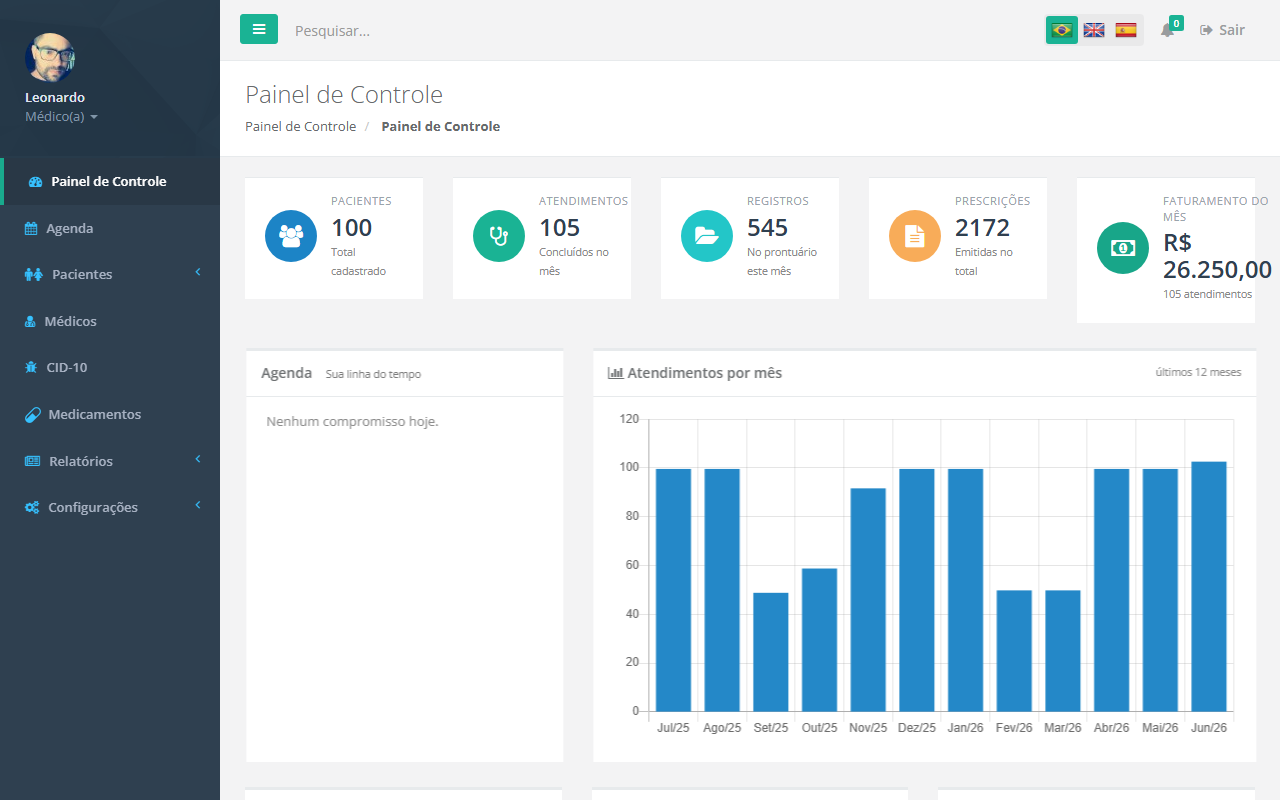
Screenshots
Overview
Easy Clinic is a complete clinic management platform developed for Brazilian medical practices. It covers every operational dimension of a small-to-medium clinic: patient registration with photo and CPF validation, a calendar appointment scheduler with drag-and-drop and multi-doctor resource views, a full patient clinical record system with a timeline of visits, and a document engine for generating prescriptions, medical certificates, and exam requests from reusable templates.
The clinical record module goes beyond simple note-taking. Doctors can design custom intake forms using a visual drag-and-drop form builder, order exams from a self-learning catalog that infers reference ranges from free-text entries and filters them by patient gender and age, and track patient evolution over time — BMI, weight, blood pressure, SpO₂, and heart rate — with trend charts rendered via Chart.js.
On the business side, the dashboard surfaces live KPIs (total patients, appointments this month, monthly billing) and a 12-month appointment history chart. Three dedicated report screens cover appointment volume, patient demographics (age groups, gender distribution), and production billing. Automated appointment reminders are sent by email and SMS via a background cron job.
The system ships in two editions. The paid edition is a full-stack reactive application: multi-user with role-based access control (super-admin, medical_doctor, default), server-side validation, and real-time pub/sub data sync. The free edition (the rip/ folder) is a zero-backend PWA that runs entirely in the browser — all collections are loaded from flat JSON files into an in-memory store, with optional IndexedDB persistence for returning users. It exposes the same screens and feature surface as the paid edition, making it suitable for a solo practitioner who doesn't need multi-user or real-time sync.
Both editions are installable PWAs sharing the same icons and app identity, and are fully responsive — every screen (dashboard, calendar, patient records, forms) adapts cleanly across desktops, tablets, and phones, with a touch-friendly off-canvas navigation drawer on smaller viewports. Beyond installability, each PWA is tuned to what it actually is: the free edition's service worker gives it genuine offline data access (IndexedDB), while the paid edition — a live, multi-user backend — instead surfaces its real-time connection: a live online/offline banner, a non-disruptive "update available" prompt for hot code push, and a taskbar icon badge reflecting patients currently waiting.
Built with Meteor 1.4, MongoDB 3.2, Blaze, and Bootstrap 3. Deployed via Docker. The UI is in Brazilian Portuguese with English and Spanish i18n support.
Highlights
Full-stack reactive clinic platform
Built a multi-user clinic management system on Meteor + MongoDB covering the complete patient journey — registration, scheduling, clinical records, prescriptions, and billing — giving a medical practice a single source of truth for all daily operations.
Custom clinical documentation engine
Engineered a drag-and-drop form designer, rich-text prescription and certificate templates, and an intelligent exam catalog with machine-learned reference ranges by patient gender and age — replacing paper-based workflows and standardizing clinical documentation across the practice.
Zero-infrastructure PWA edition
Architected a standalone free edition that runs entirely in the browser via IndexedDB with no server or database required, so solo practitioners get the full feature set — every screen, every report, offline-capable — at zero infrastructure cost.
Features
Dashboard & Analytics
- KPI cards
- Total patients, appointments this month, clinical records this month, total prescriptions, monthly billing.
- Appointment history chart
- 12-month bar chart of completed appointments.
- Records breakdown
- Pie chart of clinical record types (forms, prescriptions, certificates, exam requests).
- Age group distribution
- Bar chart of patient population by age band (0–17, 18–29, 30–44, 45–59, 60+).
- Gender demographics
- Donut chart of patient gender split.
- Today's agenda
- Scrollable list of today's scheduled appointments with quick access to patient records.
Patient Management
- Patient registration
- Full profile: name, CPF (with validation), date of birth, gender, address, phone, email.
- Photo capture
- Camera capture or file upload for patient profile photos.
- Patient list
- Searchable, sortable DataTables list with inline avatars and accent-neutralized search.
- Age-aware context
- Patient age passed to the exam catalog for gender- and age-appropriate reference ranges.
Clinical Records
- Patient timeline
- Chronological timeline of all encounters; expandable entries per visit.
- Custom intake forms
- Fill any form model during a consultation; results stored in the patient's record.
- Prescriptions
- Generate prescriptions from rich-text templates; stored in the timeline.
- Medical certificates
- Issue certificates from templates; stored in the timeline.
- Exam requests
- Order lab exams from document templates; stored in the timeline.
- Lab exam results
- Enter measured values against a catalog of exams; altered results flagged automatically.
Patient Evolution Tracking
- BMI
- Computed from weight and height; classified (normal / overweight / obese) with delta since first visit.
- Weight & height
- Trend over all visits.
- Blood pressure
- Systolic / diastolic; classified (normal / elevated / hypertensive).
- Heart rate & SpO₂
- Trend over all consultations.
- Trend charts
- Four Chart.js line charts — BMI, weight, blood pressure, heart rate & SpO₂ — on the patient's Evolution tab.
Appointment Scheduling
- Visual calendar
- Calendar Scheduler with day, week, and month views.
- Multi-doctor resource view
- Timeline view with one column per doctor; patient photo shown on the event.
- Drag & drop
- Move and resize events directly on the calendar.
- Appointment statuses
- Scheduled → Waiting → Attending → Finished / No-show; color-coded.
- Quick patient creation
- Create a new patient from within the scheduling form without leaving the calendar.
- Configurable slots
- Admin sets the appointment duration per doctor.
- Automated reminders
- Cron job fires every 30 minutes; sends email and SMS to patients with upcoming appointments.
- Calendar export (.ics)
- Download a single appointment or the visible day/week/month range as a standard .ics file.
- Calendar syncPaid
- Doctors get a personal, revocable feed link to subscribe their schedule in Google, Outlook, or Apple Calendar.
Document & Form Engine
- Document model editor
- SummerNote rich-text editor with variable interpolation (patient name, date, doctor, etc.).
- Prescription templates
- Reusable prescription layouts; selected at consultation time.
- Certificate templates
- Medical certificate templates with free-text and structured fields.
- Exam request templates
- Templates for lab or imaging referrals.
- Form model designer
- Drag-and-drop form builder (form-builder.js); supports text, select, checkbox, date, and more.
- Custom form rendering
- Built forms render inside the consultation modal and their data is persisted to the patient record.
Exam Catalog
- Searchable catalog
- Autocomplete search across hundreds of lab exams.
- Smart reference ranges
- Reference values filterable by patient gender and age group.
- Machine learning
- When a doctor enters a free-text reference value for a new exam, the system parses it (e.g. "13–17", "até 200", "> 30") and stores a structured rule for future use.
- Usage tracking
- Exams are ranked by usage count so the most-ordered tests surface first in autocomplete.
Reference Catalogs
- Drug catalog
- Searchable medication database with offline support (ground:db).
- ICD-10 browser
- Complete international disease classification; offline-capable with persistent client cache.
- Medical specialties
- CRUD management of clinical specialties assigned to doctors.
Administration & Reporting
- Doctor profiles
- Name, specialty, photo, and configurable work-hour blocks per day.
- User management
- Create / edit users; assign roles; send enrollment email automatically.
- Role-based access
- Roles: super-admin, medical_doctor, default; privileged methods guarded server-side.
- Clinic settings
- Set appointment value (used for billing KPI).
- CSV import
- Bulk patient import via CSV (PapaParse); validation run on a staging collection before commit.
- Report — Appointments
- Monthly appointment counts by doctor; filterable date range.
- Report — Patients
- Demographics: age distribution, gender breakdown, new patients over time.
- Report — Production
- Monthly billing KPI, total procedures by type (forms, prescriptions, certificates, exam requests), 12-month production bar chart.
- Multi-language
- pt-BR, English, and Spanish via tap:i18n.
Free vs. Paid edition
The free edition is a static PWA — no server, no database, no install. It runs in any browser and stores data locally via IndexedDB. The paid edition is the full-stack Meteor application with a MongoDB backend, multi-user access, and real-time data sync.
| Feature | Free PWA | Paid (Meteor) |
|---|---|---|
| Data storage | Browser (IndexedDB) | MongoDB |
| Deployment | Static hosting | Docker / Server |
| Offline support | Service Worker + IndexedDB | Fallback page only |
| Dashboard & KPIs | ||
| Patient management | ||
| Patient photo upload | ||
| Clinical records timeline | ||
| Prescriptions & certificates | ||
| Exam requests | ||
| Lab exam results | ||
| Patient evolution charts | ||
| Document model editor | ||
| Drag & drop form designer | ||
| Exam catalog with smart ranges | ||
| Drug catalog | ||
| ICD-10 browser | ||
| Reports (3 screens) | ||
| CSV patient import | ||
| Multi-language (pt-BR / en / es) | ||
| Responsive (mobile / tablet / desktop) | ||
| Installable (PWA / add to home screen) | ||
| Appointment scheduling | ||
| Multi-doctor resource view | ||
| Drag & drop calendar | ||
| Calendar export (.ics download) | ||
| Calendar feed (Google/Outlook/Apple) | ||
| Live connection status banner | ||
| Non-disruptive update prompt (hot code push) | ||
| Taskbar icon badge (live waiting-patient count) | ||
| Multi-user accounts | Single user | Unlimited |
| Role-based access control | ||
| Real-time reactive data sync | ||
| Server-side validation & security | ||
| Automated SMS reminders | ||
| Automated email reminders | ||
| Audit hooks (before insert/update) |