Well, this is a humble post…
Unfortunately my ultrabook was stolen (armed robbery), so I scrounged up a borrowed Philco netbook.
Obviously the processing power leaves something to be desired, but even so, since it has an HDMI output I hooked it up to my TV, and even though it doesn't have built-in bluetooth I plugged in a dongle I had, and I'm sitting in my armchair writing this article.
Actually, I decided to take a break from gaming to record the experience and do this blog justice. Since you never know when I'll need to run Half Life 2 on a netbook again… (lol)
After I installed the game its performance left a lot to be desired. With a framerate near 5 fps when smoke and enemies showed up, plus sporadic flickers, it made for a terrible experience. Even so, it didn't stop me from making good progress in the game (I played like that until I got the hovercraft).
That's when I thought: there must be a way to reduce the graphics quality even further so it becomes more responsive. Searching on good old Google I found the following article:
http://netbookist.com/blog/2011/06/23/half-life-2-on-a-netbook/
Obviously someone had to have gone through the same experience, and once again the ORACLE proved useful. Just download the low.cfg file and save it in the hl2/cfg folder of your Half Life 2 installation, then edit the game's launch shortcut by adding the following parameter: +exec low.cfg in the Target field after the quotes (see the image below).
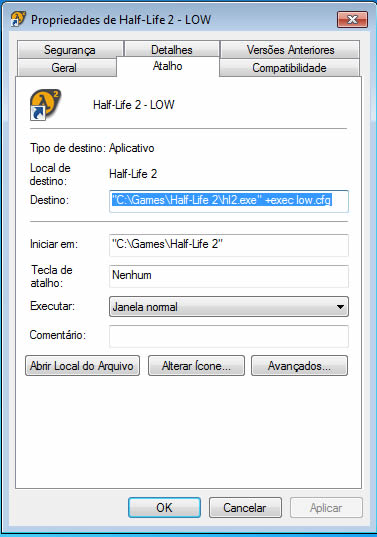
Half Life 2 Low.cfg
This was enough for me, but if you need more, the original article shows a few more tweaks.
Comments 0
No comments yet.