I'm starting the development of this blog you're reading and at the moment I use it in my development environment. I have apache2, php and mysql installed on my Linux Mint Debian, and
WordPress is running on localhost. The first time I went to test the site on another machine on the network I used the server machine's IP, www.devhouse.com.br, and noticed that the CSS and none of the images were working.
The CSS was solved by editing the site settings and changing from to in "WordPress Address" in the general settings, as shown in the figure below:
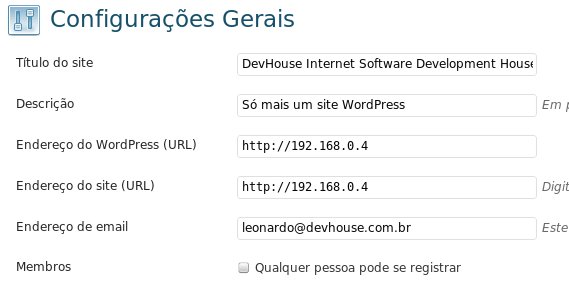
WordPress General Settings.
After the change the site appeared correctly, but the images in the posts didn't. Searching the internet I found that it's a WordPress characteristic for SEO and to make life easier for some plugins. The problem I see is: imagine if one day I decide to change domains? Imagine the problem it would be, after years of publishing, to have to change all the posts? Well, that's exactly what we'll have to do, but in an easier way: by running a small sql command on the WordPress database.
You can open phpMyAdmin, MySQL Workbench, or use the command line. Run the following SQL statement:
update wp_posts set post_content = replace(post_content,'','')Replace "" with your address.
If you don't have access to the database, you can install the Search and Replace plugin, whose function is to search for strings across the entire site and replace them.
That's it!
Comments 0
No comments yet.